Drop a song to find its musical key and Camelot code, with the keys that mix well and the BPM alongside. No file? Use the microphone or a shared tab. This key finder runs in your browser and uploads nothing.
Drop songs here to find their BPM and key
MP3, WAV, FLAC, M4A, AAC, OGG. Up to 50 files, 100 MB each.
Choose audio files
No file handy?
--BPM
Tap along to the beat. Four or more taps give a steady reading.
Play the music near your device and press start. The audio is analysed in this tab and never recorded or sent.
--BPM
Locked
Not listening yet.
Playing a song in another browser tab, such as YouTube, SoundCloud or a web player? Share that tab and tick “Share tab audio”. Nothing is downloaded or uploaded, the sound is analysed right here.
--BPM
Locked
Not sharing yet.
Tab audio needs desktop Chrome, Edge or another Chromium browser. On other browsers use Upload or Microphone.
Analysed on this device
Audio never uploaded
No account
--BPM
0
confidence
0:00 / 0:00
Results
Check the beat grid
0:00
-- BPM
Play the song with the click on. Clicks that land on the beat mean the BPM is right. If they feel twice as fast or half as fast, press ÷2 or ×2. Space plays and pauses.
Features
What this key finder tells you about a song
One engine reads the key, the Camelot code, the tempo and the keys that mix well, and checks the result by ear.
Musical key and Camelot code together
Every song you drop into the key finder comes back with its key written two ways: the name, such as A minor, and the Camelot code, such as 8A. Producers read the name and DJs read the code, so one result serves both without a chart.
Keys that mix well, shown for you
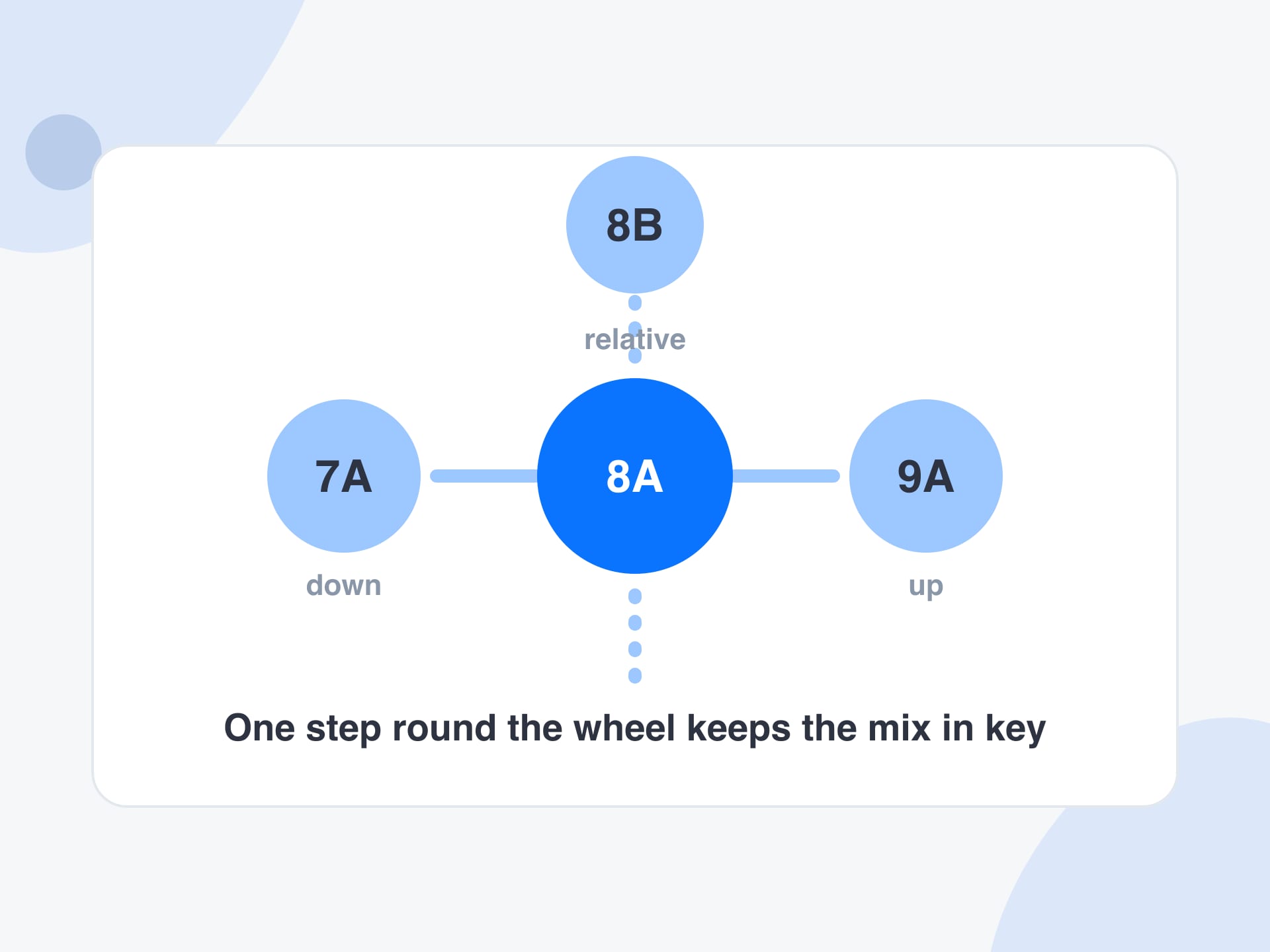
Right under the key, the key finder lists the three codes that blend cleanly with it: one step down the wheel, one step up, and the relative major or minor. You can pick your next track from that short list instead of guessing.
BPM beside the key
Harmonic mixing needs tempo as well as key, so the key finder reads both in one pass. You get the BPM, a Low, Medium or High confidence label and a beat grid you can hear, all next to the key.
Files, microphone or a shared tab
Drop up to 50 files at once, hold a microphone to a speaker, or share a browser tab with sound. The key finder uses the same engine for each, so a crate of MP3 files and a live room are handled with identical logic.
Private, free and without limits
The key finder works on your own device. Songs are never uploaded, microphone sound is not recorded, and there is no account, credit counter or daily cap. Read a key, copy it, or export the whole batch as a CSV sheet.
What it is
What is a key finder?
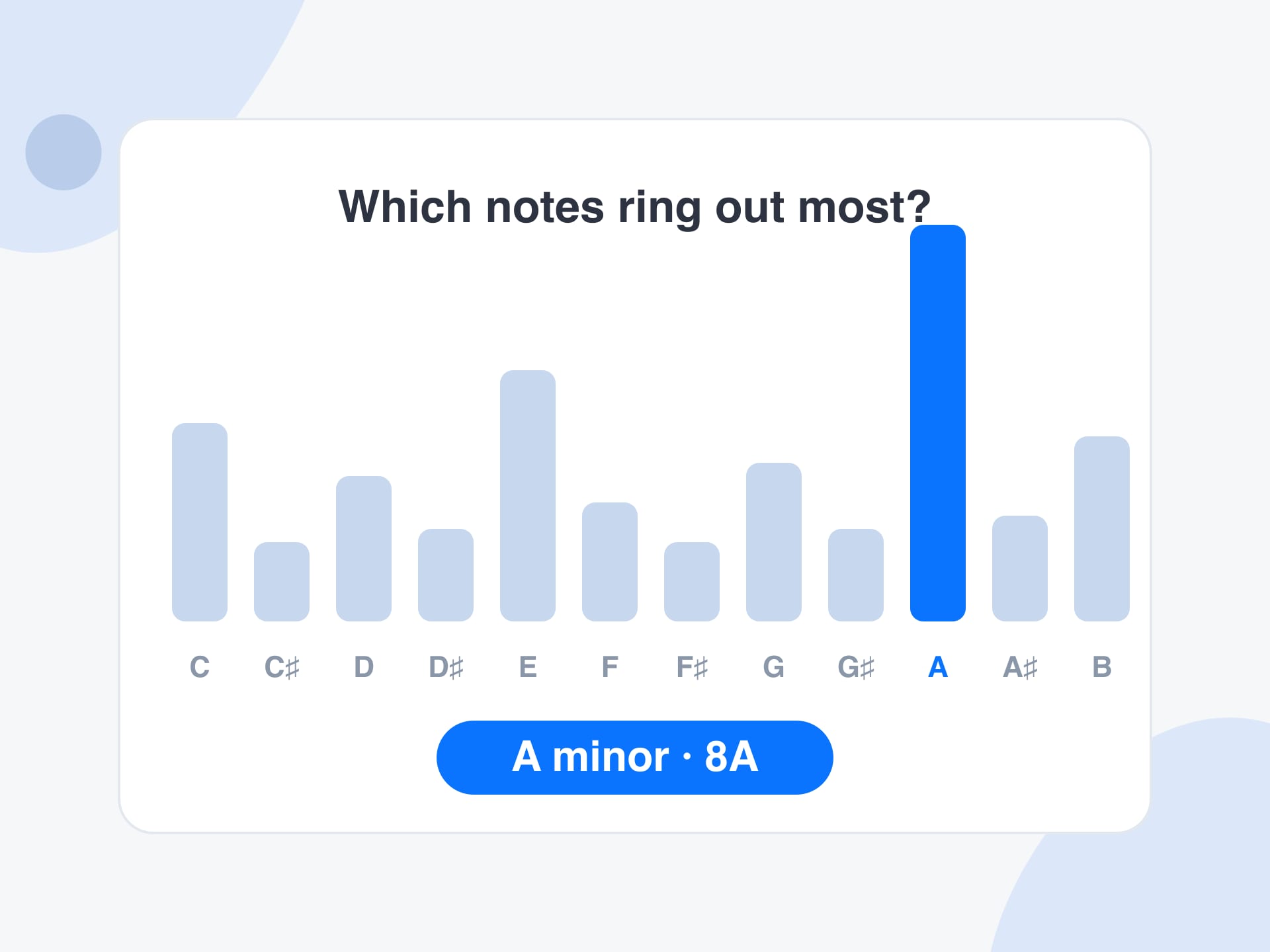
A key finder tells you which musical key a song is in. The key is the home base of the music: the note that feels like arriving, and the set of notes that fit around it. A song in A minor mostly uses the notes A, B, C, D, E, F and G, and it feels like it resolves to A. This key finder works that out from the sound inside your browser.
Under the hood the key finder listens for how loud each of the twelve notes is across the song, folding every octave together. It compares that picture with the typical shape of major and minor keys and picks the closest match. It also keeps the runners-up, which is why a result can come with alternatives. The key is shown as a name and as a Camelot code.
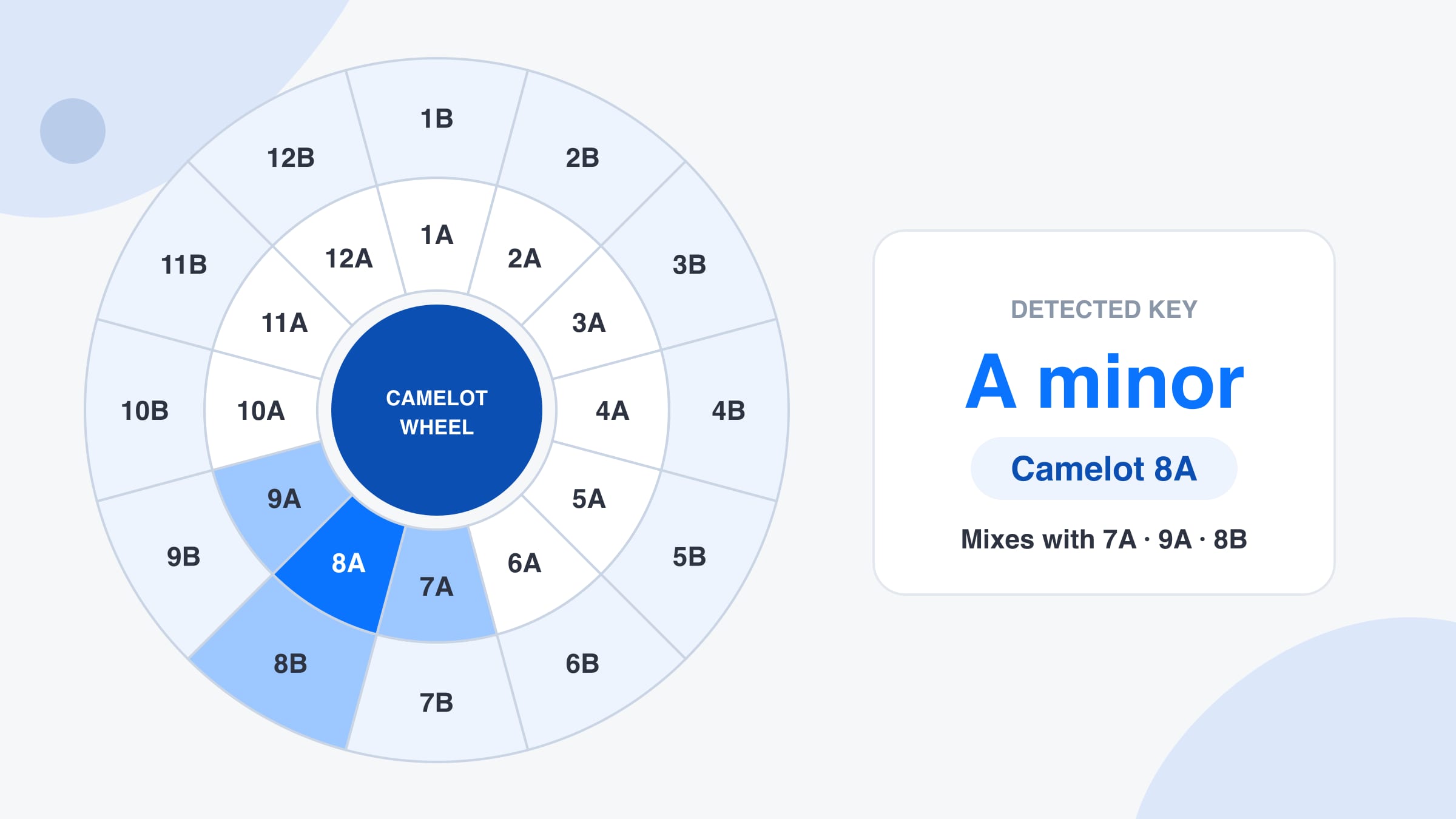
The Camelot wheel is a map DJs use to mix in key. It numbers the major and minor keys from 1 to 12, with A for minor and B for major, so any two tracks with neighbouring codes share most of their notes. After every reading the key finder lists the codes that blend with your key. Nothing is uploaded, and nothing is looked up in a database.
How to use
How to find the key of a song in three steps
Step 1
Drop in your songs
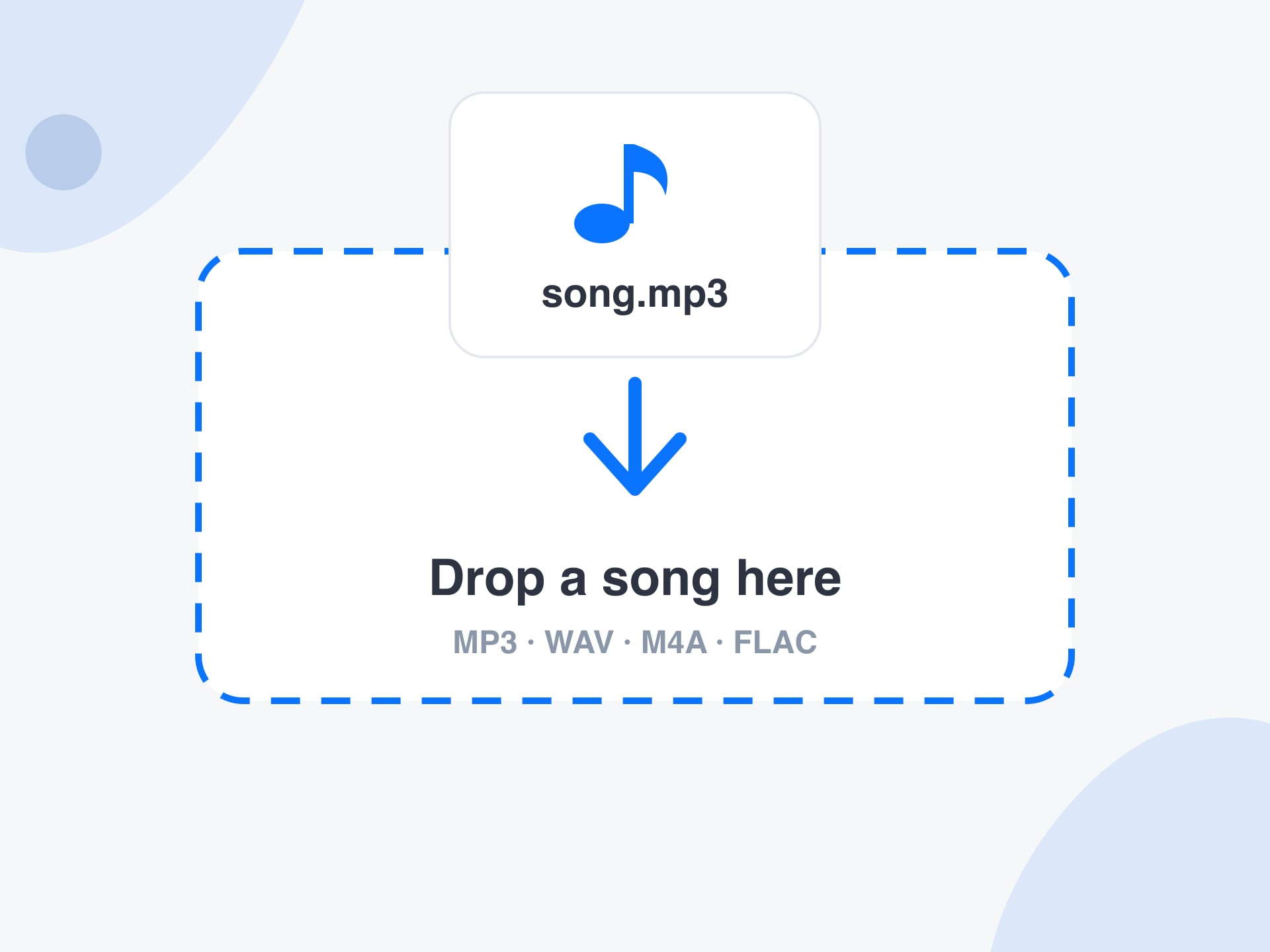
Drag MP3, WAV, M4A, FLAC or OGG files onto the key finder, or press Choose audio files and select up to 50 songs. No file to hand? Open the Microphone or Tab audio tab and let the key finder listen while the music plays.
Step 2
Read the key and its Camelot code
Each song gets a large key reading such as A minor with its Camelot code 8A, plus the BPM, the length and a confidence label. Behind the number is a bar for each of the twelve notes, and the loudest cluster of notes decides the key.
Step 3
Pick the next track from the wheel
The key finder lists the Camelot codes that mix with your key. Choose a track whose code is one step away, or the same number with the other letter, and the transition stays in key. Export a CSV to sort a whole folder.
Why use it
Why use this key finder
What you gain from analysing the sound itself, on your own device.
It listens to the audio, not a catalogue
A lookup site can only tell you the key of songs it already knows. This key finder measures the sound, so it also works for unreleased tracks, bootlegs, stems, samples and a recording of your own band.
No upload, no queue, no leak
Because the key finder runs in your browser, a track never travels over the network. A demo you are not ready to share stays private, and a large WAV does not wait in an upload queue before you see the answer.
Made for mixing, not just naming
Knowing a song is in A minor is useful. Knowing that 7A, 9A and 8B will blend with it is what saves time in a set. The key finder puts that next step on screen instead of leaving you to look it up.
Honest about what it can and cannot hear
The key finder shows a confidence label and the alternatives it considered. If a track has no clear tonal centre, it tells you so, rather than printing a confident answer that sends you into a clashing mix.
Reference
Camelot codes and the keys they stand for
The key finder writes a code beside each key. The wheel has twelve numbers, with A for minor keys and B for major keys. Flats are shown here, and a sharp name is the same key written another way.
Camelot code with its minor key and its major key
Camelot number
A (minor)
B (major)
1
A♭ minor
B major
2
E♭ minor
F♯ major
3
B♭ minor
D♭ major
4
F minor
A♭ major
5
C minor
E♭ major
6
G minor
B♭ major
7
D minor
F major
8
A minor
C major
9
E minor
G major
10
B minor
D major
11
F♯ minor
A major
12
C♯ minor
E major
Limits and tips
Key finder tips and honest limits
Analyse a stretch with sustained notes. Drums-only loops, spoken word and noise have no clear pitch, so the key finder may show Low confidence there. That is an honest answer, not a fault.
Key is an estimate, and it is still marked beta. Songs that change key, such as pop tracks with a final lift, get one reading for the whole file. Listen to risky transitions before the gig.
Relative keys share the same notes. A minor and C major sound alike, which is why the key finder can lean the wrong way on some songs. Check the alternative in your head before you commit to a mix.
Detuned recordings, such as old vinyl rips or tracks sped up or slowed down, can land between two keys. The key finder picks the nearest one, so a track played at +4% may read a half step higher.
Microphone and tab capture need a loud, clean source. Laptop speakers and room noise blur the notes. Give the key finder about ten seconds of music before you trust the reading.
Camelot codes are a convenience for DJs, not a rule of music. A mix two steps away on the wheel can sound good, and a mix one step away can clash if the arrangement is dense.
Very long files are measured from a slice taken from the middle, which is plenty for a song that stays in one key. Files over 100 MB, or clips shorter than four seconds, are turned down with a plain message.
Use cases
Who uses a key finder, and how
Four real jobs, each as a small recipe.
A DJ planning a harmonic set
Sorting a crate by key and tempo before the night, using the key finder instead of loading each file into the decks.
Input: A folder of 30 MP3 files
Setting: Drop them all at once, export the CSV and sort by Camelot code and BPM
Output: A sheet with key, Camelot code, BPM and confidence for every track
Caveat: Key is a beta estimate, so listen to tricky transitions before you play them.
A producer matching a sample
Finding the key of a loop or a vocal so that new parts land in tune, using the key finder before you pitch anything.
Input: A WAV loop or an acapella
Setting: Upload it and read the key, then set your synth or scale lock to match
Output: A key such as F minor and the notes that belong to it
Caveat: A lone drum loop has no key, so expect Low confidence.
A singer choosing a comfortable key
Checking what key a backing track sits in so you can decide whether to sing it as it is or move it up or down.
Input: The backing track file
Setting: Drop it in and read the key name, then compare it with your range
Output: The key and its relative major or minor
Caveat: Backing tracks with a key change get one overall reading.
A guitarist working out a song
Finding the key of a recording so you know which chords and scale to reach for, with the key finder as a starting point.
Input: A song you can hear but have no sheet music for
Setting: Use the Microphone tab while it plays, or upload the file
Output: A key to try, with the Camelot code showing the neighbouring keys
Caveat: Treat the result as a place to start and trust your ear for the final call.
More tools
Keep going with these tools
Each one runs in your browser too, so you can move from one job to the next without uploading anything.
See the tempo of a song with its classical term, such as Andante or Allegro.
FAQ
Key finder: frequently asked questions
What is a key finder?
A key finder is a tool that works out which musical key a song is in, such as A minor or C major. This one listens to the audio in your browser and also gives the Camelot code DJs use for mixing.
How does this key finder work out the key?
It measures how much energy each of the twelve notes carries across the song, then compares that profile with typical major and minor patterns. The closest match becomes the key, and the next closest ones are kept as alternatives.
How accurate is the key finder?
It is good on songs with clear harmony and steady tonality, and weaker on tracks with little pitch, a key change or a detuned recording. The key is still marked beta, so treat it as a strong hint and confirm it by ear.
What is a Camelot code?
A Camelot code is a number from 1 to 12 plus a letter. A means a minor key and B means a major key. Keys with neighbouring codes share most of their notes, which makes them easy to mix together.
How do I mix songs in key using Camelot codes?
Move from your current code to the same code, one number up or down with the same letter, or the same number with the other letter. For 8A that means 8A, 7A, 9A or 8B, all of which usually blend cleanly.
Does the key finder also show the BPM?
Yes. Each result carries the BPM as well as the key, with a confidence label and a beat grid you can play. That way you can match tempo and key for a harmonic mix from a single reading.
Why does it say minor when I hear major?
Relative keys, such as A minor and C major, use the same seven notes, so they are easy to confuse. The key finder lists the relative key beside the result, and the Camelot number is the same for both.
Can the key finder find the key of a song I can only hear?
Yes. Open the Microphone tab and hold the device near a speaker, or use the Tab audio tab to share a browser tab that is playing the song. Allow about ten seconds for a first reading.
Are my songs uploaded anywhere?
No. The key finder analyses audio inside your browser with your own processor. Files are never sent to a server, the microphone is not recorded, and there is no account to create.
Which file types does the key finder accept?
It accepts MP3, WAV, M4A, AAC, FLAC and OGG files, plus the audio of common video files. Whether a given file opens depends on what your browser can decode, and a plain message appears if it cannot.
Can I check many songs at once?
Yes. Drop up to 50 files together and the key finder works through them one after another. You can then copy all results or export a CSV with the key, Camelot code and BPM for each track.
Is the key finder free?
Yes, it is free with no signup, no daily limit and no watermark. Because everything runs on your own device, there is no server cost to pass on, and your results stay with you.
Ready to find a key?
Drop a song, listen live, or share a tab. It takes a few seconds and nothing leaves your device.